 Sinch Agentic Tools

 Sinch SDKs


 Sinch CLI & Functions
This guide shows how to verify a user in a PHP application using the Verification API to make a Phone Call verification.
The following diagram demonstrates the flow that happens to verify a user:
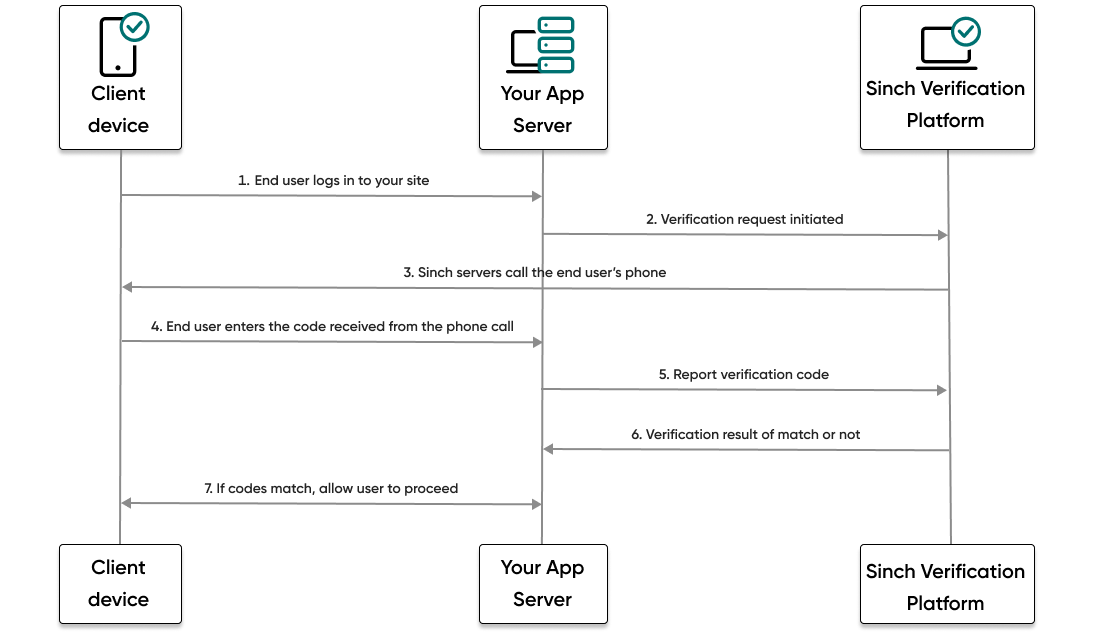
- The end user visits your website or service and tries to log in.
- Your backend then makes a request to the Sinch platform and initiates a Phone Call verification request.
- The Sinch platform calls the phone number of the user with a text-to-speech message containing a code.
- The user enters the code they received.
- Your backend makes a report verification request using the code the user entered.
- If the code matches, your backend will receive a success result from Sinch.
- The user, now verified, can proceed to log in to your site or service.
Now you're ready to get started by initiating a verification request.