 Sinch Agentic Tools

 Sinch SDKs


 Sinch CLI & Functions
The Sinch APIs authenticate with short-lived OAuth2 access tokens (bearer tokens). You obtain one by presenting your access key to the token endpoint using the client credentials grant, then send the token on each API request.
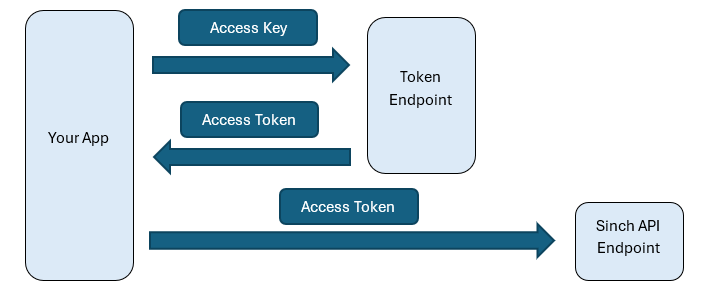
You authenticate with the access key only once per token, not on every request. The token is what travels on your API calls.
Send a POST to the token endpoint with grant_type=client_credentials, authenticating with your Key ID and Key Secret via HTTP Basic auth:
curl https://auth.sinch.com/oauth2/token \
  -X POST \
  -d "grant_type=client_credentials" \
-u "YOUR_key_id:YOUR_key_secret"| Placeholder | Description |
|---|---|
YOUR_key_id | Your access key's Key ID. |
YOUR_key_secret | Your access key's Key Secret. |
A successful response returns a JSON body:
{
  "access_token": "eyJhbGciOi...",
  "token_type": "Bearer",
  "expires_in": 3600,
  "scope": ""
}| Field | Description |
|---|---|
access_token | The bearer token to send on API requests. |
token_type | Always Bearer. |
expires_in | Token lifetime in seconds. Access tokens are short lived, typically one hour. |
Access tokens are short lived for security. Request a new one when the current token nears expiry, rather than trying to extend it.
Send the token in the Authorization header as a bearer credential. For example, a call to retrieve available numbers:
curl https://numbers.api.sinch.com/v1/projects/YOUR_project_id/availableNumbers \
-H "Authorization: Bearer YOUR_access_token"| Placeholder | Description |
|---|---|
YOUR_project_id | The project that owns the resource. |
YOUR_access_token | The access_token value from Step 1. |
Now you're ready to call any Sinch API with your token.
Access tokens are valid for its full expires_in window. Cache the token and reuse it until shortly before it expires, rather than fetching one per API call.
A simple strategy:
- Request a token and store it with its expiry time.
- On each API call, reuse the cached token if it isn't near expiry.
- When it's within ~60 seconds of expiry, request a new token. If a request returns a 401, check the
WWW-Authenticateheader to determine whether the access token has expired, is invalid, or is missing. If the token has expired, request a new token and retry the request.
Treat a 401 Unauthorized as your signal to refresh the token once and retry. If the retry also fails, the problem is the credentials or scope, not expiry.
| Symptom | Likely cause | Fix |
|---|---|---|
| 401 from the token endpoint | Wrong Key ID/Secret, or secret mistyped | Re-copy the Key Secret, or create a new access key. |
| 401 from an API call | Missing or invalid authentication, such as no Authorization header or an invalid/expired token Token expired, malformed header. | Refresh the token; confirm the header is Authorization: Bearer <token>. |
| 403 from an API call | Key's project doesn't own the resource | Use a key from the project that owns the resource. |
| Invalid credentials error | Invalid credentials when using APIs that follow the new Sinch REST API standards | See the Sinch API error registry for details. |
Manage who can create keys and projects in Team & access management.