 Sinch Agentic Tools

 Sinch SDKs


 Sinch CLI & Functions
Secure your application and authorize Sinch client (user) registrations.
When you start SinchClient you must provide a user identity. The first time the application instance and the Sinch client run on behalf of a particular user, they must register with the Sinch service. Registration requires a token that authenticates the application and authorizes the user to register. After successful registration, the client obtains credentials to perform authorized requests on behalf of the application and that user, including making and receiving calls.
To authorize user registration, the application must provide a registration token to the SinchClient. This token should be a JSON Web Token (JWT) signed with a key derived from the application secret.
We recommend keeping the application secret securely on your backend, generating and signing the token on the server, then sending it over a secure channel to the application and Sinch client running on the device.
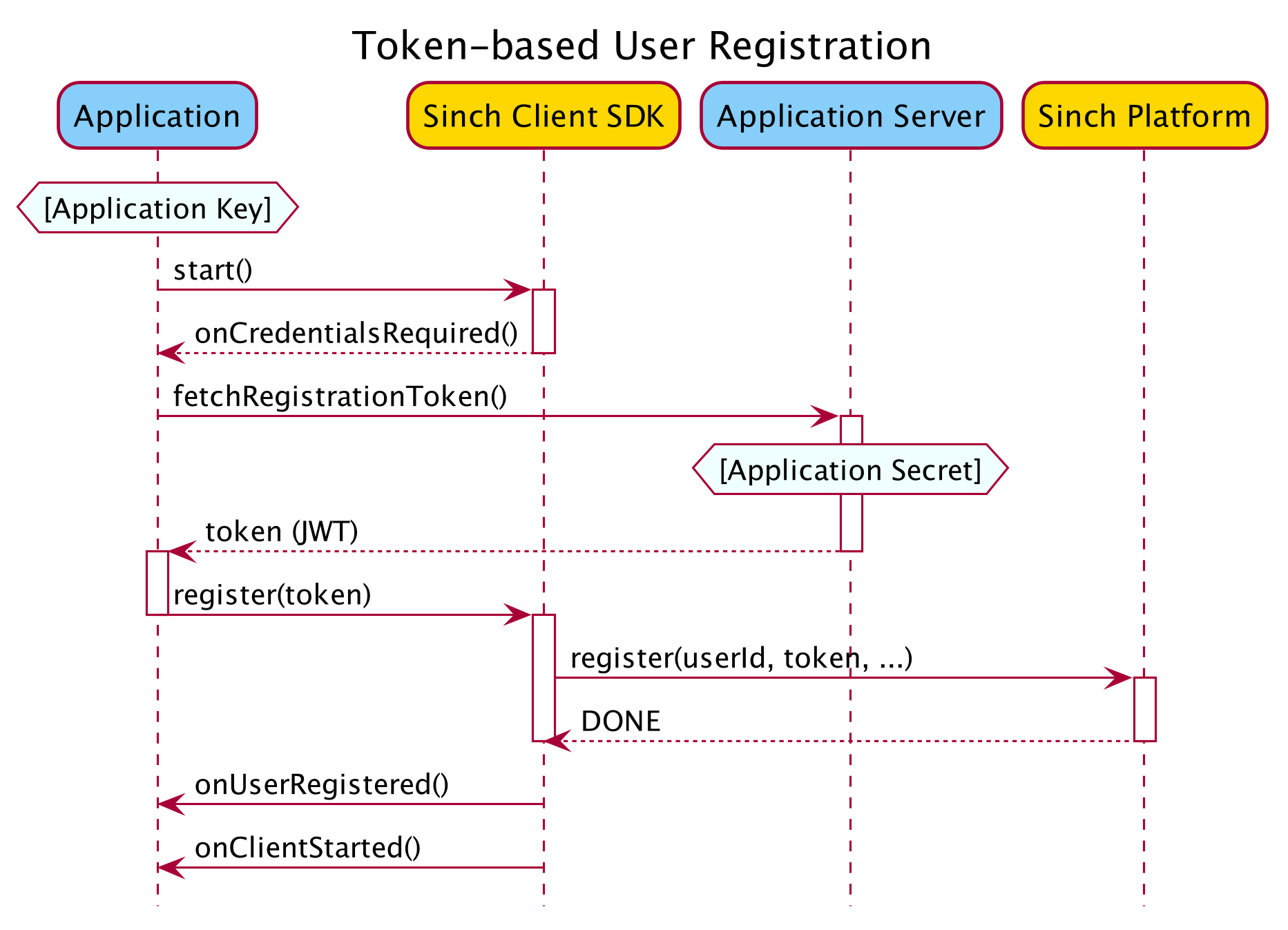
The following sections describe how to create and sign the JWT, and how to provide it to the SinchClient.
A registration token is a JWT with the following JWT header parameters:
| Header Parameter | Value | Note |
|---|---|---|
alg | HS256 | |
kid | hkdfv1-{DATE} | Where {DATE} is current date in UTC on format YYYYMMDD |
Example of JWT header:
{
  "alg": "HS256",
  "kid": "hkdfv1-20200102"
}The {DATE} used in the kid parameter must be the current UTC date at the time the challenge is made (when onCredentialsRequired is called).
The JWT must contain the following claims:
| Claim | Value / Description |
|---|---|
iss | //rtc.sinch.com/applications/{APPLICATION_KEY} |
sub | //rtc.sinch.com/applications/{APPLICATION_KEY}/users/{USER_ID} |
iat | See JWT RFC 7519 section-4.1.1 |
exp | See JWT RFC 7519 section-4.1.4 |
nonce | A unique cryptographic nonce |
Set the token expiration (exp) so that the token TTL is at least 1 minute.
The JWT should be signed using a signing key derived from the Sinch Application Secret as follows. Given:
- A function
HMAC256(message, key). - A date-formatting function
FormatDate(date, format). - The current date as variable
now. - Sinch Application Secret as variable
applicationSecret, holding the secret as a base64 encoded string.
Derive the signing key as follows:
signingKey = HMAC256(BASE64-DECODE(applicationSecret), UTF8-ENCODE(FormatDate(now, "YYYYMMDD")))Implementations of hash hmac256 to derive the key vary from language to language in terms of the order of the key, data and sometimes the hashing algorithm arguments passed, please pay attention to this.
Given the following input:
- Application Key =
a32e5a8d-f7d8-411c-9645-9038e8dd051d - Application Secret =
ax8hTTQJF0OPXL32r1LHMA==(in base64 encoded format) - User ID =
foo - nonce =
6b438bda-2d5c-4e8c-92b0-39f20a94b34e - Current time:
2018-01-02 03:04:05 UTC - JWT expiry = 600 seconds (
expwill be set to 600 seconds afteriat)
We can construct a JWT as follows:
JWT header:
{
  "alg": "HS256",
  "kid": "hkdfv1-20180102"
}
JWT payload:
{
  "iss": "//rtc.sinch.com/applications/a32e5a8d-f7d8-411c-9645-9038e8dd051d",
  "sub": "//rtc.sinch.com/applications/a32e5a8d-f7d8-411c-9645-9038e8dd051d/users/foo",
  "iat": 1514862245,
  "exp": 1514862845,
  "nonce":"6b438bda-2d5c-4e8c-92b0-39f20a94b34e"
}
Derived signing key:
The derived signing key would in this case be AZj5EsS8S7wb06xr5jERqPHsraQt3w/+Ih5EfrhisBQ= (base64 encoded format)
Final encoded JWT:
The encoded JWT output below contains both the JSON header and payload as shown above, with the claims in exactly the same order as the example and the JSON in minified format.
eyJhbGciOiJIUzI1NiIsImtpZCI6ImhrZGZ2MS0yMDE4MDEwMiJ9.eyJpc3MiOiIvL3J0Yy5zaW5jaC5jb20vYXBwbGljYXRpb25zL2EzMmU1YThkLWY3ZDgtNDExYy05NjQ1LTkwMzhlOGRkMDUxZCIsInN1YiI6Ii8vcnRjLnNpbmNoLmNvbS9hcHBsaWNhdGlvbnMvYTMyZTVhOGQtZjdkOC00MTFjLTk2NDUtOTAzOGU4ZGQwNTFkL3VzZXJzL2ZvbyIsImlhdCI6MTUxNDg2MjI0NSwiZXhwIjoxNTE0ODYyODQ1LCJub25jZSI6IjZiNDM4YmRhLTJkNWMtNGU4Yy05MmIwLTM5ZjIwYTk0YjM0ZSJ9.EUltTTD4fxhkwCgLgj6qSQXKawpwQ952Ywm3OwQSARo`More detailed examples on how to implement this in various languages, including reference data for unit tests, is available at https://github.com/sinch/sinch-rtc-api-auth-examples.
For additional information about JWT, along with a list of available libraries for generating signed JWTs, see https://jwt.io. For detailed information about the JWT specification, see https://tools.ietf.org/html/rfc7519.
When starting the client (SinchClient.start()), the client will ask for a token via SinchClientListener.onCredentialsRequired().
const sinchClient = Sinch.getSinchClientBuilder()
    .applicationKey("<application key>")
    .environmentHost("ocra.api.sinch.com")
    .userId("<user id>")
    .build();

sinchClient.addListener(sinchClientListener);
sinchClient.start()
In your SinchClientListener:
onCredentialsRequired: (sinchClient, clientRegistration) => {
  yourAuthServer
    .getRegistrationToken(sinchClient.userId)
    .then((token) => {
      clientRegistration.register(token);
    })
    .catch(() => {
      clientRegistration.registerFailed();
    });
};The client may also ask for a token on subsequent starts via onCredentialsRequired(). Only then should you provide a new JWT.
If you receive "Instance creation rate exceeded" messages on user registration, verify you are using onCredentialsRequired() correctly and investigate why your app is re‑registering the same user so frequently. If you are not sure, contact support.
Depending on your security requirements, you may want to limit a client registration time-to-live (TTL). Limiting the client registration will effectively limit the Sinch client acting on behalf of the User on the particular device after the TTL has expired. This will prevent the client from making or receiving calls after the registration TTL has expired.
To limit the registration in time, create the JWT as described in the sections above, but with the additional claim sinch:rtc:instance:exp. The value for this claim should be in the same format as claims iat and exp, that's a JSON numeric value representing the number of seconds since Unix Epoch (UTC).
Example JWT payload:
{
  "iss": "//rtc.sinch.com/applications/a32e5a8d-f7d8-411c-9645-9038e8dd051d",
  "sub": "//rtc.sinch.com/applications/a32e5a8d-f7d8-411c-9645-9038e8dd051d/users/foo",
  "iat": 1514862245,
  "exp": 1514862845,
  "nonce":"6b438bda-2d5c-4e8c-92b0-39f20a94b34e",
  "sinch:rtc:instance:exp": 1515035045
}
TTL of the registration must be >= 48 hours. In other words: sinch:rtc:instance:exp - iat >= 48 * 3600.
When a Sinch client registers with a User registration token, the registration is also bound to the particular device. Limiting the TTL of the registration is device-specific and doesn't affect other potential registrations for the same User on other devices.
Don't confuse sinch:rtc:instance:exp with the standard JWT claim exp - they're separate claims. The former is for limiting the client registration. The latter is only for limiting the TTL of the JWT itself.
We recommend a 12 months expiry, unless you have reasons to keep it shorter.
The instance expiry specified in sinch:rtc:instance:exp will be used as the:
- Initial instance expiry when a new instance is created
- New instance expiry when an existing instance tries to prolong its lifetime
The Sinch client will automatically request to extend the TTL of its registration by invoking SinchClientListener.onCredentialsRequired()
The request to extend the client registration TTL is triggered when the Sinch client is started and the expiry of TTL is detected to be near in the future. "Near in the future" is subject to internal implementation details, but the Sinch client will try to eagerly extend its registration and will adjust the interval according to the TTL.
You can't provide a JWT without specifying registration TTL if a JWT with limited TTL has been used before for the given user on the specific device. Once a registration has been constrained with TTL, it can be extended in time, but not indefinitely.

