Start new verification requests.
Verification | Sinch (2.0.1)
Sinch offers a platform for phone number verification. It consists of different software development kits (the Sinch SDKs) that you integrate with your smartphone or web application and cloud based back-end services as well as a REST API. Together, they enable SMS, Flashcall, Phone Call, and Data verification in your application. Test.
Verify users with SMS, flash calls (missed calls), a regular call, or data verification. This document serves as a user guide and documentation on how to use the Sinch Verification REST APIs.
The Sinch Verification API is used to verify mobile phone numbers. It's consumed by the Sinch Verification SDK, but it can also be used by any backend or client directly.
The Sinch service uses four different verification methods:
- SMS: Sending an SMS message with an OTP code
- FlashCall: Placing a flashcall (missed call) and detecting the incoming calling number (CLI)
- Phone Call: Placing a PSTN call to the user's phone and playing a message containing the code
- Data: By accessing internal infrastructure of mobile carriers to verify if given verification attempt was originated from device with matching phone number
Note:
If you want to use data verification, please contact your account manager.
For general information on how to use the Sinch APIs including methods, types, errors and authorization, please visit the Authentication page.
Available authentication methods are:
- Application Signed Request: Strongest method, recommended for production use
- Basic Authentication: Strong and easy, recommended for prototyping
- Public Authentication: Weak method, suitable only for specific scenarios
With the flashCall verification method, a user's phone number is verified by triggering a "missed call" towards this number. The call is automatically intercepted by the Android SDK in the mobile app and blocked automatically. iOS and JavaScript use cases require manual interaction where user has to enter incoming phone call number in the application.
To initiate a flashCall verification, visit Android SDK documentation. For additional security, it's recommended that you control which verification requests should proceed and which ones not, by listening in your backend for the Verification Request Event and respond accordingly. Your backend will be notified on the result of the verification with the Verification Result Event.
With the SMS verification method, a user's phone number is verified by sending an SMS containing an OTP code to this number. In the case of iOS or JavaScript, the user needs to enter the OTP manually or semi-manually in the application, while for Android there is an option of intercepting the SMS message delivery and capturing the OTP code automatically.
To initiate an SMS verification, check the iOS or Android documentation. For additional security, it's recommended that you control which verification requests should proceed and which ones not, by listening in your backend for the Verification Request Event and respond accordingly. Your backend will be notified on the result of the verification with the Verification Result Event.
It's possible to specify the content language for SMS verification. The desired language is set in the initiate verification request 'Accept-Language' header. Setting this header is optional. If not included the application's default SMS content language is used, which by default is en-US. If an SMS template for the desired language is not found it's defaulted to 'en-US' unless a different default language has been defined for the requesting application. More information on the 'Accept-Language' header can be found from IETF and the HTTP/1.1 documentation.
Note:
The content language specified in the API request or in the callback can be overridden by carrier provider specific templates, due to compliance and legal requirements, such as US shortcode requirements.
Example - SMS verification specifying content language
Headers: ... Accept-Language: es-ES ... [POST]
https://verification.api.sinch.com/verification/v1/verifications
{
"identity": { "type": "number", "endpoint": "+46700000001" },
"method": "sms"
}The actual language that was selected is returned in the Content-Language HTTP content header. As outlined above, this may differ from the requested language due to either that language not having SMS content defined, or it being overridden by provider requirements.
Example - SMS verification response with selected content language
Headers: ... Content-Length: 103 Content-Language: es-ES Content-Type:
application/json; charset=utf-8 Expires: -1 ...
{
"id": "1087388",
"sms": {
"template": "Tu código de verificación es {{CODE}}.",
"interceptionTimeout": 120
}
}With the Phone Call verification method, a user's phone number is verified by receiving a phone call and hearing a pre-recorded or text-to-speech message containing OTP code. The user is then expected to enter this code in the application.
To initiate a Phone Call verification, check the Start Verification documentation. For additional security, it's recommended that you control which verification requests should proceed and which ones not, by listening in your backend for the Verification Request Event and respond accordingly. Your backend will be notified on the result of the verification with the Verification Result Event.
With the data verification method, a user's phone number is verified by mobile carrier's infrastructure itself. This method requires cellular data usage on end-user's device and is currently limited in its coverage.
Note:
If you want to use data verification, please contact your account manager.
In combination with the Mobile or Web SDK (recommended)
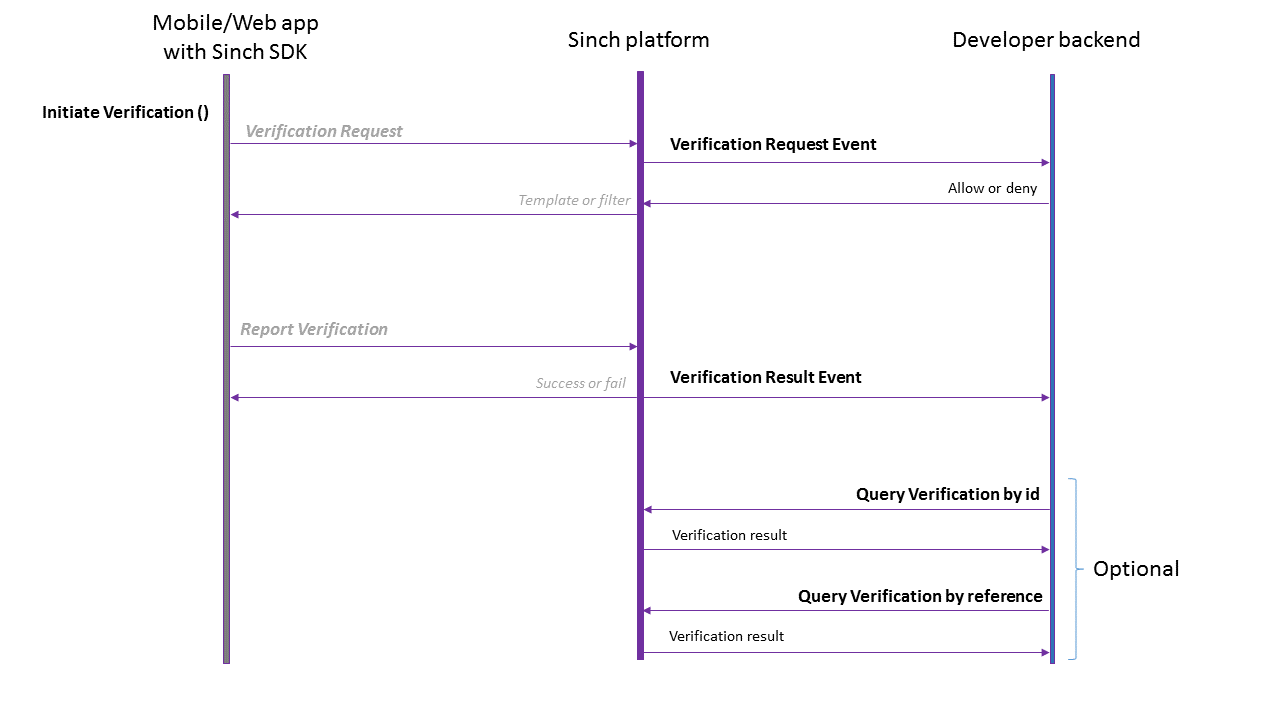
The following diagram shows how to use the Verification APIs when using the iOS, Android or JavaScript SDKs to initiate a verification.
Important!
In this scenario, the Verification Request and Report Verification APIs don't need to be called explicitly by the app, since the SDK is handling that for you.
If you have configured a verification callback URL in the Sinch Portal (recommended), with every verification that's initiated by the app, Sinch will send a Verification Request Event to your backend, to get permission to perform the verification. If your backend allows the verification request to proceed, Sinch will trigger a flashcall, SMS or call towards the phone to be verified. Once the phone receives the flash-call, SMS or voice call, the SDK will report back the CLI or OTP respectively so that the Sinch dashboard can compare its validity. The Sinch backend responds with the result of the verification to the client and sends a Verification Result Event to your backend. The status of a verification can also be queried ad-hoc by using the "Query Verification" APIs.
If you are not using the mobile or web Verification SDKs, then you need to implement all the client logic for intercepting calls (in case of flashcalls) and reporting the CLI or OTP (in case of SMS or Phone Call verification) inside your app. The following diagram shows how to use Sinch Verification in this scenario.
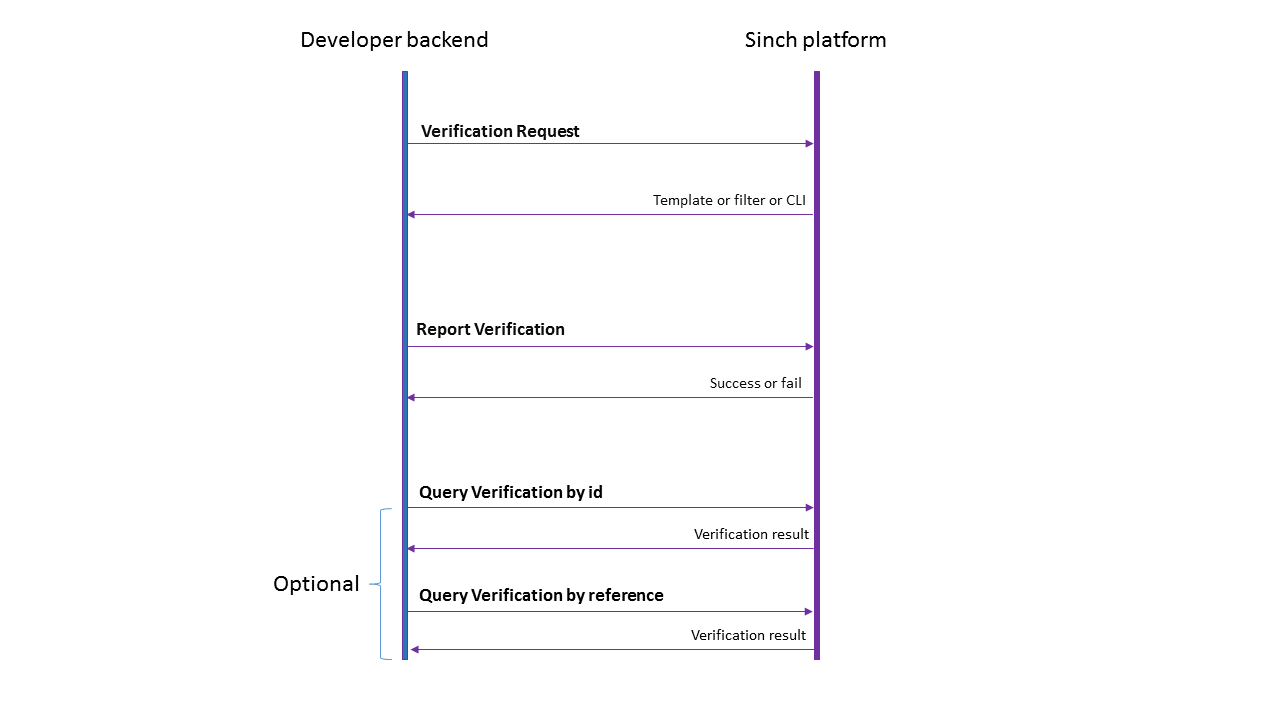
The verification requests will be triggered from your backend towards Sinch with the Verification Request API, by doing a signed request. Sinch dashboard will respond with the CLI filter (for flashcalls) or the template (in case of an SMS), or the polling intervals (in case of a Phone Call). As soon as the flashcall or SMS is received by your app, your backend will need to report back to Sinch the CLI or OTP that was reported through the Report Verification API. Sinch will respond with the result of the verification.
Download OpenAPI description
Overview
Languages
Servers
https://verification.api.sinch.com
Get the status of specific verification requests in the verification process. Returns the status of pending and completed verifications. You can retrieve the status of verification requests by using the ID of the request, the phone number of the user being verified, or a custom reference string.
Operations