Voice API v2 (2.0.59)
Make and receive voice calls with Sinch's RESTful Voice API interface.
The Voice API enables embedding voice calling into applications for virtually limitless use cases. From number masking for privacy, automated appointment reminders, and outreach campaigns with answering machine detection, to bridging calls between PSTN and SIP endpoints, the API offers the flexibility and control needed for modern communications.
| Concept | Description |
|---|---|
| Session | A session initiates as soon as the first call is created. It serves as a container for all related calls and their connections, maintaining context and state throughout the interaction. The session persists until all associated calls are terminated. |
| Call | A single participant's connection in a session (e.g., caller or callee).
|
| Bridge | A mechanism to connect one or more calls, so that participants can communicate with each other. 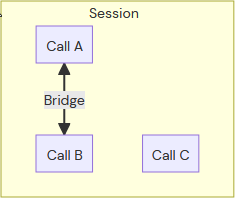 |
There are a few ways to create a call:
- Inbound Calls: Triggered by incoming traffic from PSTN, SIP, or other sources.
- Outbound Calls (via Dial): Initiated from within an existing call session using the
dialcommand. - Outbound Calls (via API): Created directly by sending an API request to the Voice API.
- Call Queuing: Calls can be queued and processed based on parameters such as priority, time, or custom logic.
The new Voice API v2 supports Call pacing via batch calling to efficiently manage high volumes of outbound calls. This is especially useful for scenarios like appointment reminders, notifications, or campaigns where customers need to reach multiple recipients in a controlled and scalable way.
To initiate several calls in a batch, send a POST request to the /v2/projects/{projectId}/batches endpoint. The request body contains a SVAML payload describing the call flow and a list of parameters for each call in the batch. The API queues and triggers calls according to the provided configuration, such as maximum calls per second (maxCps) and time-to-live (ttlSeconds).
{
  "commands": [
    {
      "command": "dial",
      "callName": "batch-notification",
      "from": {
        "type": "PHONE",
        "phone": { "number": "@from" }
      },
      "to": {
        "type": "PHONE",
        "phone": { "number": "@to" }
      },
      "events": {
        "onAnswer": [
          {
            "command": "messages",
            "messages": [
              {
                "type": "SAY",
                "say": {
                  "text": "Hello @name, you have an appointment tomorrow at 10 AM.",
                  "voiceName": "Emma_3"
                }
              }
            ]
          }
        ]
      }
    }
  ],
  "parameters": [
    { "from": "+46712345678", "to": "+46787654321", "name": "Alice" },
    { "from": "+46712345678", "to": "+46781234567", "name": "Bob" }
  ],
  "batchOptions": {
    "maxCps": 10,
    "ttlSeconds": 60
  }
}- commands: SVAML commands describing the call flow for each call in the batch. Parameter placeholders start with
@and can be used as variables for each call. They can be used alone as in@fromor in combination with text in a say message (e.g.,Hello @name, your appointment is at @time). - parameters: An array of objects, each specifying the values for the placeholders in the commands. Each object represents a call to be queued and triggered.
- batchOptions: Controls how the batch is processed:
maxCps: Maximum number of calls per second to be initiated.ttlSeconds: Time-to-live for the batch in seconds; calls not initiated within this time window will be skipped.
The API responds with metadata for the batch operation:
- batchId: The batchId identifies the entire batch operation, allowing batch state and summaries to be queried, or the batch to be managed as a whole (e.g., cancel unprocessed calls).
- Other properties: The response also includes the project and service the batch belongs to.
Each call in the batch is assigned a unique sessionId, which can be used to track the state and progress of individual calls. The session identifiers are retrieved via the [GET] /v2/projects/{projectId}/batches/{batchId}/details endpoint.
When a batch request is submitted:
- The API validates the SVAML commands and parameters.
- Calls are queued and triggered according to
maxCpsandttlSecondssettings. - Each call is processed independently, using the provided parameters to personalize the call flow.
- The API tracks the state of each call (e.g.,
QUEUED,INITIATED,IN_PROGRESS,COMPLETED). - Batch progress can be monitored and summaries can be retrieved via the [GET]
/v2/projects/{projectId}/batches/{batchId}endpoint.
A call progresses through several states from creation to completion.
Call States
| State | Description |
|---|---|
QUEUED | Call is waiting to be processed. |
INITIATED | Call setup is in progress (ringing). |
IN_PROGRESS | Call is answered and active. |
COMPLETED | Call ended normally. |
REJECTED | Recipient rejected the call. |
NO_ANSWER | Recipient did not answer. |
CANCEL | Call was cancelled before being answered. |
BUSY | Recipient was busy. |
FAILED | Call could not be set up. |
Call Transitions
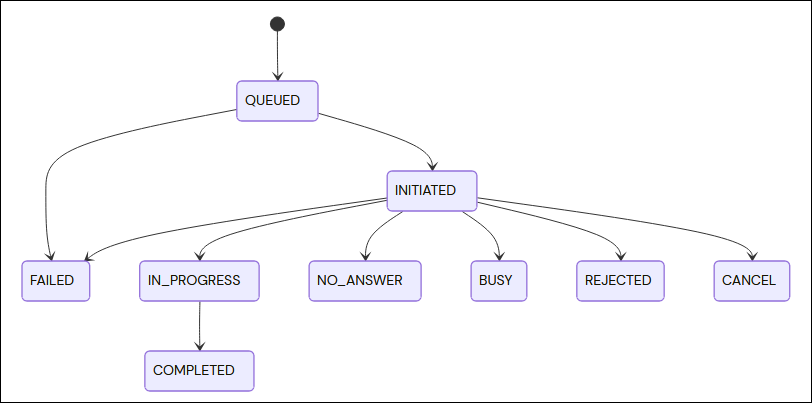
This diagram shows how a call moves between states. Typically, most calls start at QUEUED, progress to INITIATED, and either get answered (IN_PROGRESS) or end in a final state (COMPLETED, NO_ANSWER, etc.).
When a specific event occurs (for example, a call is answered), the Voice API v2 sends an HTTP request (usually POST) to the webhook URL configured in service settings. The request contains details about the event, such as call identifiers and timestamps. The application can then respond with SVAML commands to control the ongoing call or perform other actions.
- An event (e.g., call.answered) occurs in the Voice API.
- The API sends a POST request to the configured webhook endpoint with event details.
- The server processes the event and responds with SVAML commands (e.g., play a message, gather input).
- The API executes the commands and updates the call state.
Webhook endpoints must respond within 5 seconds. If the endpoint fails or times out and a fallbackUrl is configured, the request is re-sent to the fallback URL. See Timeouts and failover in the Webhooks section for the algorithm and its effect on delivery guarantees.
Events are named using the pattern resource.command.event.
For example:
call.answered: Indicates that a call was answered.call.amd.machine: Indicates that the Answering Machine Detection (AMD) on a call detected a machine.
This convention helps clearly identify the resource, the command involved, and the specific event that occurred.
When handling events in call flows, the Voice API applies the following precedence rules to determine which SVAML commands are executed:
Command-Level Event Handlers:
If an event handler (e.g.,on_answer,on_machine) is defined directly within a SVAML command, the commands specified in that handler are executed first for that event.Service Configuration Fallback:
If the event handler is not defined in the SVAML command, the API falls back to the event handler defined in the service configuration. This allows default behaviors for events to be set at the service level.Execution Order:
- Command-level event handlers always take priority over service-level handlers.
- If neither is defined, the event is ignored and no commands are executed for that event.
Best Practice:
Define event handlers in SVAML commands for custom, per-call logic. Use service configuration event handlers for default or global behaviors across all calls.
When a call is answered, the API sends a POST request to the configured webhook endpoint that includes the event type and the current call details.
The webhook endpoint should return a valid SVAML payload specifying which commands to execute on the call. For example, the response below synthesizes a welcome message and then ends the call.
{
  "commands": [
    {
      "command": "messages",
      "messages": [
        {
          "type": "SAY",
          "say": {
            "text": "Welcome to our service!",
            "voiceName": "Emma_3"
          }
        }
      ],
      "events": {
        "onFinish": [
          {
            "command": "hangup"
          }
        ]
      }
    }
  ]
}The following table displays the servers available for each region.
| Region | Server |
|---|---|
| Global endpoint - Redirected by Sinch to the closest region. | https://voice.api.sinch.com |
| North America 1 - East | https://us1.voice.api.sinch.com |
| South America 1 - East | https://br1.voice.api.sinch.com |
| Europe 1 - Central | https://eu1.voice.api.sinch.com |
| Asia Pacific 1 - Southeast | https://sg1.voice.api.sinch.com |
| Australia & Oceania 1 - Southeast | https://au1.voice.api.sinch.com |
- Respond Quickly: Webhook requests should be processed and responded to as quickly as possible to avoid call delays.
- Idempotency: A failed request is re-sent to the fallback URL, so the same event can arrive more than once. Make the handler idempotent and deduplicate on the
ce-idandce-sourceheaders — see Timeouts and failover in the Webhooks section. - Logging: Log incoming webhook requests and responses for troubleshooting and auditing.
- Validation: Validate incoming requests to ensure they are from the Voice API (see Security below).
To safeguard a webhook endpoint, verify that incoming requests are genuinely sent by the Voice API and have not been altered in transit. This prevents unauthorized access and mitigates risks such as man-in-the-middle attacks.
- Each service has an identifier and a secret.
- When a webhook arrives, use the secret to compute a signature over the canonical request string.
- Compare the computed signature to the one in the request authorization header.
- Only process the webhook if the signatures match.
For the exact Authorization header format, the canonical string that is signed, the signature algorithm and a worked example, see Request signing on the Call webhook operation in the Webhooks section.
Access to the webhook endpoint may also be restricted by IP address, and HTTPS can be used to encrypt traffic.