 Sinch Agentic Tools

 Sinch SDKs


 Sinch CLI & Functions
Sinch Voice API: Choosing between v1 and v2
For all new projects, please use Voice API v2. This is especially important for projects involving:
- AI capabilities like Streams and Voice Relay
- Voice campaigns like Batch calling
You should only use the older Voice API v1 if one of the following is a strict requirement:
- The project must be in General Availability (GA).
- The project requires In-App voice or Conferencing (until these features are available in v2).
The Voice API enables embedding voice calling into applications for virtually limitless use cases. From voice-enabling AI agents to allow real-time conversational AI workflows over the phone, to number masking for privacy, automated appointment reminders, and outreach campaigns with answering machine detection, to bridging calls between PSTN and SIP endpoints, the API offers the flexibility and control needed for modern communications.
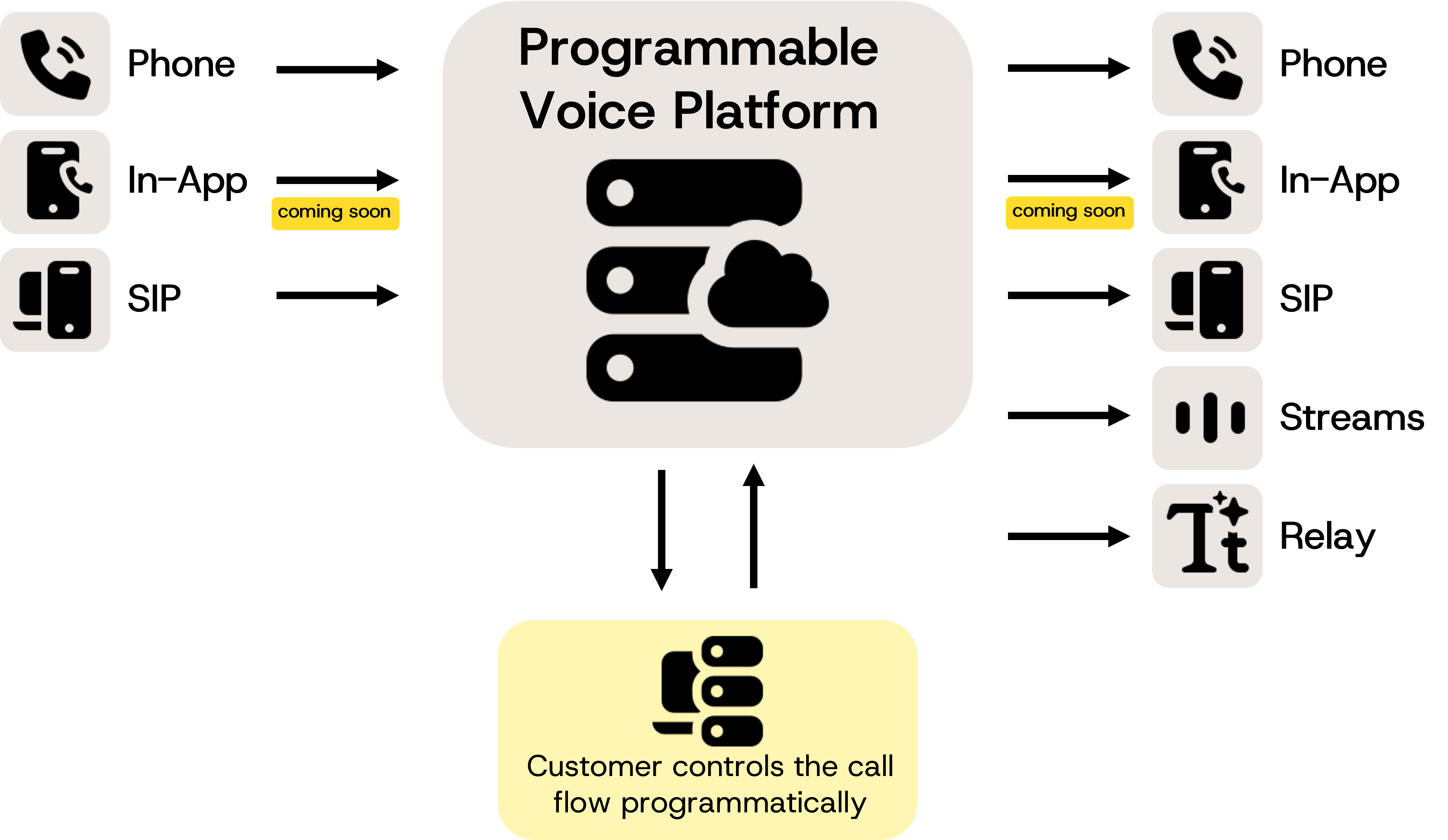
The Sinch Programmable Voice is a cloud-native global voice platform, composed by multiple Inbound and Outbound voice channels. All these channels can be combined using our powerfull markup language called SVAML v2, creating a toolbox, capable of building almost limitless use cases. Our SVAML uses the concept of COMMANDS, customers can use a combination of our commands to interact with calls in all channels, in order to model from the most basic to highly complex scenarios, required to fulfill their voice calling needs.
| Name | Type | Description |
|---|---|---|
| Phone Inbound | Channel | Allow customers to receive multiple & concurrent phone calls via a Sinch Number |
| Phone Outbound | Channel | Allow customers to make multiple phone calls to regular phone numbers globally |
| SIP Inbound | Channel | Allow customers to receive multiple & concurrent SIP phone calls via a Sinch SIP infrastructure |
| SIP Outbound | Channel | Allow customers to make multiple SIP phone calls via a Sinch SIP infrastructure |
| Voice Relay Outbound | Channel | Allow customers to make multiple two-way TEXT Stream(WebSocket) calls to external WebSocket servers |
| Voice Streams Outbound | Channel | Allow customers to make multiple two-way AUDIO Stream(WebSocket) calls to external WebSocket servers |
| In-App Inbound | Channel | coming soon |
| In-App Outbound | Channel | coming soon |
| Name | Type | Description |
|---|---|---|
| Recording Offline | Feature | Record channel and push result file to customer's cloud storage after recording is finished |
| AMD | Feature | Enable Answering Machine detection when a outbound call is answered |
| TTS | Feature | TextToSpeech - Enable conversion of text into audio in multiple languages, genders and quality of synthetic speech |
| IVR | Feature | coming soon |
| Conference Calling | Feature | coming soon |
| Name | Description |
|---|---|
| Call your chatbot with Voice Relay | Connect a live onone call dırecty to any text-based conversational Al using voice relay. |
| Voice enable your Al agent | Stream live phone calls to your Al Agent via WebSockets. |
| Voice alerts | Notify users by phone calls about time sensitive or critical updates, like deliveries, security codes or reminders. |
| Post call analytics | Record and transcribe calls post-conversation to simplify compliance, training, and dispute resolution. |
| Number masking | Hide caller and recipient phone numbers by routing calls via proxy numbers. |
| Detect voicemail | Determine if a call is answered by a person or a voicemail, enabling you to automate the appropriate next action. |
The API supports both inbound and outbound calls across PSTN, SIP, and streaming endpoints, enabling developers and businesses to create scalable, intelligent voice solutions tailored to their needs.
Event-Driven Control:
Define call flows, trigger actions, and respond to events using SVAML (Sinch Voice API Markup Language) commands, either inline or via webhooks to a backend for dynamic, programmable call management.
The Voice API provides flexible mechanisms for initiating and controlling calls, enabling both static and dynamic call flows. Developers can define call behavior upfront using SVAML commands or implement real-time event-driven logic via webhooks, tailoring the experience to specific use cases.
- Sinch Account: Create your self-serve account via Sinch Dashboard or an Enterprise account via Sinch Sales.
- Setting Up: Via the Sinch Dashboard, configure services in the project and define how calls are handled (e.g. use webhooks vs inline SVAML commands).
- Authentication: Secure API access using an access token created from the API key and secret in the Sinch Dashboard.
- Call Initiation: Start calls via API requests or in response to inbound traffic.
- Call Control: Use SVAML commands to manage call behavior (e.g., play audio, gather input, bridge calls).
- Event Handling: React to call events by executing nested SVAML commands or responding to webhook notifications, enabling dynamic and automated call flows.
There are basically 2 main ways to interact with the API:
- Predefined call behavior using SVAML Commands: Directly send a set of SVAML commands to the API that already describe the entire call behavior.
- Using Webhooks: Configure webhooks to receive real-time events during the call lifecycle, allowing the backend to respond dynamically with additional SVAML commands based on the call state and events.
Example: Call behavior with SVAML Commands
It is possible to interact with the API without having a backend, by using static SVAML commands defined in the service configuration.
In this case, the service configuration must include all necessary SVAML commands to handle call flows and events.
For example, to make an outbound call and play a welcome message when the call is answered, this SVAML payload can be used:
{
"commands": [
{
  "command": "dial",
  "name": "my-first-call",
  "from": {
    "type": "PHONE",
    "phone": {
      "number": "+46712345678"
    }
  },
  "to": {
    "type": "PHONE",
    "phone": {
      "number": "+46787654321"
    }
  },
  "events": [
    {
      "on_answer": [
        {
          "command": "messages",
          "name": "my-welcome-message",
          "messages": [
            {
              "type": "say",
              "say": "Welcome to our service",
              "format": "text"
            }
          ]
        }
      ]
    }
  ]
  }
]
}
Example: Dynamic call behavior with Webhooks
A basic end-to-end interaction between a customer backend and the Voice API using SVAML commands and webhooks:
- When the call is answered, the Voice API sends a webhook to the backend notifying that the call has been answered.
- The backend responds with SVAML commands to perform Answering Machine Detection (AMD) and play a message.
- If AMD detects a machine or a beep, the Voice API sends another webhook to the backend.
- The backend responds with additional SVAML commands to stop any ongoing messages, play an alternate message, and hang up the call.
All interactions are handled via SVAML commands and webhooks, allowing for dynamic and programmable call flows.