 Sinch Agentic Tools

 Sinch SDKs


 Sinch CLI & Functions
Sinch Voice API: Choosing between v1 and v2
For all new projects, please use Voice API v2. This is especially important for projects involving:
- AI capabilities like Streams and Voice Relay
- Voice campaigns like Batch calling
You should only use the older Voice API v1 if one of the following is a strict requirement:
- The project must be in General Availability (GA).
- The project requires In-App voice or Conferencing (until these features are available in v2).
This document provides an overview of Sinch SIP calling service.
When using Sinch for voice calling, the Sinch platform can be seen as a big telephony switch. It receives incoming phone calls (also known as incoming call “legs”), sets up outgoing phone calls (also known as outgoing call “legs”), and bridges the two. In Sinch SIP calling service the incoming call legs and outgoing call legs is to your own SIP infrastructure such as a SIP IP-PBX, SBC or similar equipment. Using SIP calling together with our Voice API v2.0 you can combine all different types of channels and features the Sinch platform supports, such as PSTN, Stream, VoiceRelay, recording and transcriptions.
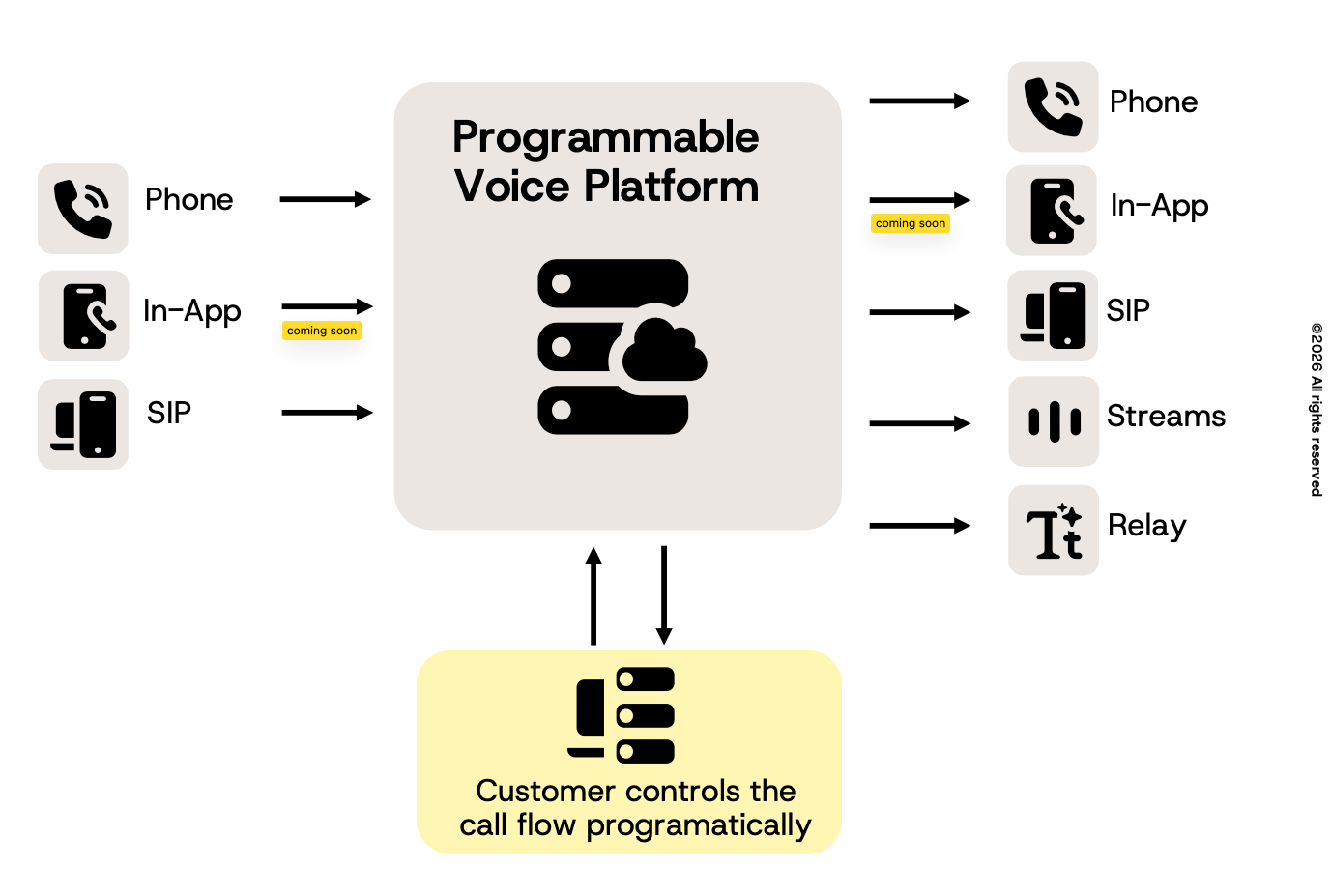
SIP legs are handled via WebHooks or via a Service Call Behaviors.
A Static SIP trunk consists of SIP Inbound, SIP Outbound or both flows combined. The most common use case is to configure a SIP trunk to handle below flows:
- SIP Inbound to PHONE Outbound.
- PHONE Inbound to SIP Outbound.
Each flow needs its own app configuration in the Sinch Build Portal. How this is configured is described under SIP Inbound, SIP Outbound and service config sections below.
If you need more control or advanced calls flow, you can instruct a call to be connected to your SIP server by responding to the Incoming Call Event callback with the ConnectSIP action. The Callback could handle both SIP Inbound and SIP Outbound.
Add one service for SIP INBOUND. This service's key and secret is used for SIP authentication. Add one service for SIP OUTBOUND. On this service SIP forwarding should be configured and number(s) be assigned.
Configure one service with a Callback URL set. This service could handle both SIP Inbound and SIP Outbound call flows.
You must allowlist ALL of Sinch's IPs, subnets and ports on your firewall for SIP signalling and RTP media traffic.
You need to allow your SIP server to receive traffic from those IPs and subnets (CIDRs). Sinch strongly recommends that you allowlist all of its IP addresses and subnets.
5060 (UDP/TCP)
5061 (TCP/SIP over TLS)
| Geographical location | IP address |
|---|---|
| Europe | 206.146.136.0/28 |
| North America | 206.146.133.0/28 |
| South America | 206.146.138.0/28 |
| Southeast Asia | 206.146.139.0/28 |
| Australia | 206.146.141.0/28 |
Static IPs for media resources.
RTP ports: 10000–60000 (UDP)
| Geographical location | RTP IP address |
|---|---|
| Europe | 206.146.136.128/26 |
| North America | 206.146.133.128/26 |
| South America | 206.146.138.128/26 |
| Southeast Asia | 206.146.139.128/26 |
| Australia | 206.146.141.128/26 |
Sinch currently supports the following codecs:
- G.711u
- G.711a
- Opus
- G.729
Sinch offers support for encryption to ensure that the call media and associated signaling remains private during transmission.
Sinch supports TLS (Transport Layer Security) to encrypt SIP signaling between your SIP infrastructure and Sinch.
Sinch recommends using TLSv1.2
Secure calling supports TLSv1.2 with these cipher suites:
| Cipher suites Supported |
|---|
|
TLS_ECDHE_ECDSA_WITH_AES_256_GCM_SHA384 TLS_ECDHE_ECDSA_WITH_AES_128_GCM_SHA256 TLS_ECDHE_ECDSA_WITH_AES_256_CCM_8 TLS_ECDHE_ECDSA_WITH_AES_256_CCM TLS_ECDHE_ECDSA_WITH_AES_256_CBC_SHA384 TLS_ECDHE_ECDSA_WITH_AES_256_CBC_SHA TLS_ECDHE_ECDSA_WITH_AES_128_CCM_8 TLS_ECDHE_ECDSA_WITH_AES_128_CCM TLS_ECDHE_ECDSA_WITH_AES_128_CBC_SHA256 TLS_ECDHE_ECDSA_WITH_AES_128_CBC_SHA |
Note: If your equipment does not support these cipher suites, contact Sinch support.
SRTP provides a framework for encryption of RTP & RTCP. SRTP is offered and accepted when TLS is used as transport for your signaling.
| Cipher suites Supported |
|---|
|
AEAD_AES_256_GCM AEAD_AES_128_GCM AES_256_CM_HMAC_SHA1_80 AES_256_CM_HMAC_SHA1_32 AES_192_CM_HMAC_SHA1_80 AES_192_CM_HMAC_SHA1_32 AES_CM_128_HMAC_SHA1_80 AES_CM_128_HMAC_SHA1_32 F8_128_HMAC_SHA1_80 F8_128_HMAC_SHA1_32 |
Sinch uses certificates issued by Let's Encrypt.
To ensure successful TLS connections, install the Let's Encrypt root and intermediate certificates on your SIP devices.
How to install:
- Download the root and intermediate certificates from Let's Encrypt Certificates.
- Follow your device vendor's instructions to import these certificates.
Tip: If you experience certificate errors, verify that your device's trust store is up to date.
- No SIP response: Check that Inbound SIP URI host is the FQDNs and not the SIP proxy IPs.
- 403 Forbidden: Check your SIP credentials and authentication realm.
- TLS handshake failures: Verify your device trusts Let's Encrypt root certificates.
- One-way audio: Ensure RTP ports (10000–60000 UDP) from any IP are open on your firewall.